
Governance
Appointments, competency records, permissions and project roles
Temporary Works Portal
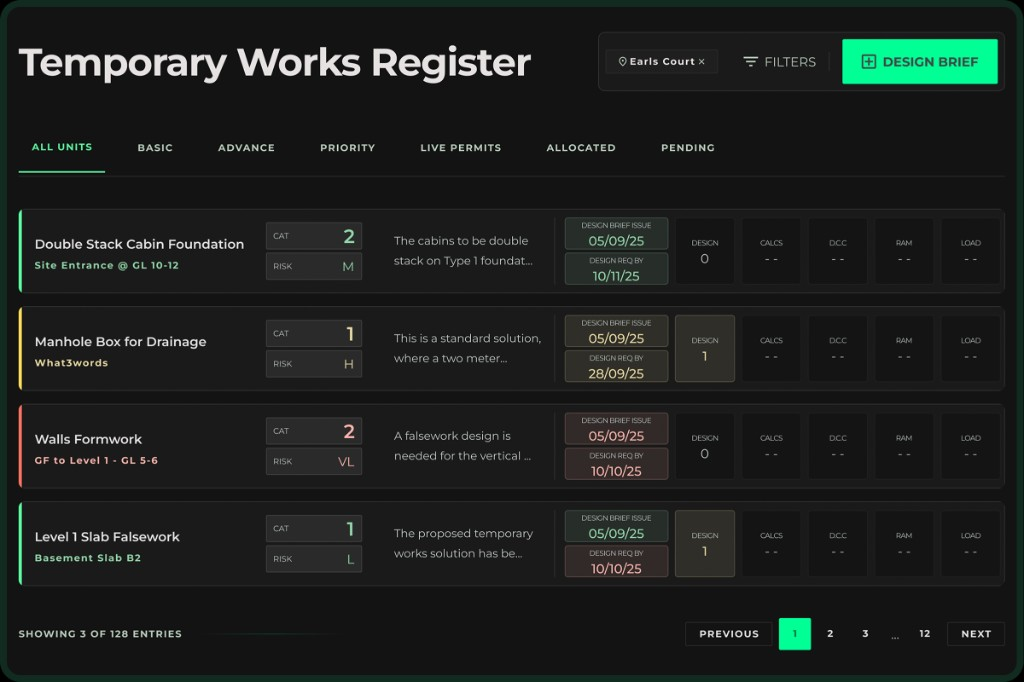
The Temporary Works Portal connects appointments, design briefs, registers, design submissions, approvals, permits, inspections, records and communication in one secure project environment.
Built from practical temporary works experience, the portal helps project teams replace fragmented spreadsheets, emails and folders with a structured workflow. Users can access the information relevant to their role from a computer, tablet or mobile device, while management retains visibility of status, responsibilities and outstanding actions.
Designed to
“Reduce administration, improve visibility and support consistent implementation of the client’s temporary works procedure and BS 5975 management principles.”
Appointments, competency records, permissions and project roles
Temporary works register, priorities, required dates and status
Design briefs, submissions, reviews, checks and approvals
Permits, inspection records, photographs and QR access
Item-specific discussions, actions and notifications
Dashboards, history, audit trail and management reporting
Controlled access for designers, checkers, subcontractors and project teams
Appointments and roles, the temporary works register, design briefs and submissions, checks and approvals, permits, inspection records, photographs, actions, notifications and management reporting in one controlled workflow.
Controlled access can be provided for designers, checkers, subcontractors and project teams according to role permissions. Management retains visibility of status, responsibilities and outstanding actions.
No. The portal supports implementation of the client’s temporary works arrangements. Procedures, appointments and duty-holder responsibilities remain with the project organisation.
Tell us about your current temporary works process, number of projects or users, and the outcomes you want to improve. We will arrange a demonstration focused on those workflows.
Yes. Clear registers, permits, records and audit trails help teams prepare for assurance reviews and provide evidence during inspections and audits where the portal is in use.
A demonstration can be configured around your company roles, approval stages and project workflow. We can also support mobilisation, training and procedure alignment.